Back to Electronics

Product Information

Availability
In Stock
Seller
seasville

About this item

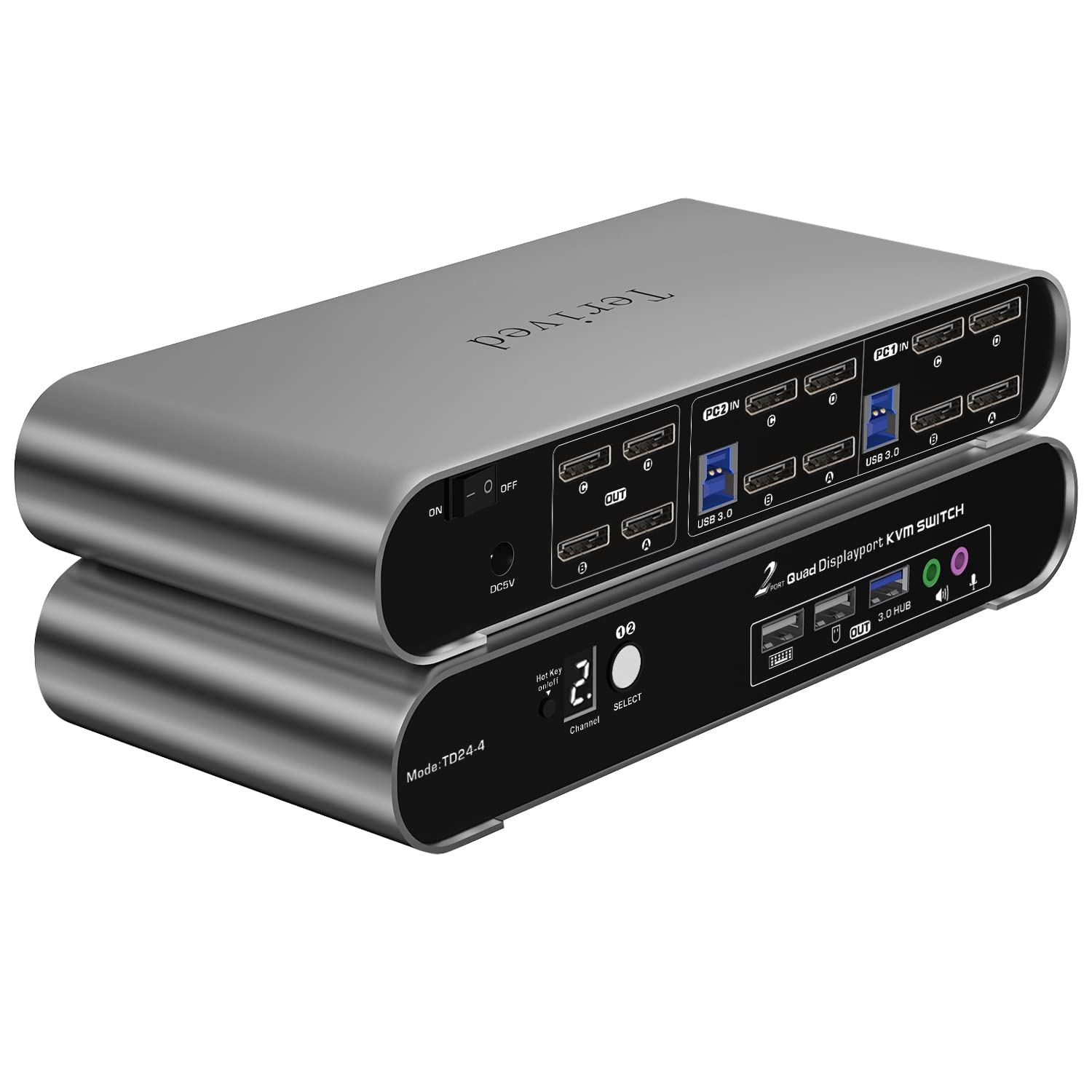
  • Attention: Attention Mac Users: Check how many monitors are supported by your apple devices before you buy. For example, an M1 Macbook Pro only supports one external monitor. This DP Quad monitor KVM switch requires 4 DP outputs for each computer. If you need more DP ports, consider suitable HDMI to DP cables that meet your monitor resolution and refresh rate. A docking station is not recommended; most of them are unstable. Ensure you use the provided cables for all monitors and computers for the best results and plug in all the USB cables between the KVM and computers. Otherwise, your keyboard, mouse, and USB 3.0 hub will not work.
  • Aluminum Alloy shell - We want to give customers the best quality; we use aluminum alloy for the body, which provides you with an excellent premium look, great drop resistance, light-weight, strong, and robust corrosion resistance
  • Digital Display- KVM Switch 2 port with a digital display which lets you easy to see the current channel even in the dark investment
  • Hotkey - Tired of a manual button switch? This product gives you a convenient way to switch with keyboard hotkeys switch
  • Two Computers Four DP Monitors KVM Switcher - Controls 2 Displayport interfaced computers or other applicable devices using one keyboard, a mouse, four DP monitors with audio & microphone, and USB 3.0 HUB for data transferring rate up to 5Gbps/s (10 times faster than USB 2.0)
  • Displayport KVM Switch 8K - Supported resolutions: 480i, 480p, 720p, 1080i, 1080p, 2K@144Hz, 4K@144Hz, 8K@30Hz RGB 4:4:4 HDR10.Auto-Scan, auto-detection Hot plug & play and HDCP. Multi-platform: support Windows 11/10/7/2000/XP/Vista, Linux, and Mac
  • KVM switch with Automatic Switching: To enable the automatic switching feature of the KVM switch, press Right [CTRL] twice, then [S], and [Enter]. The default auto-switching time is 10 seconds. (To turn it off, simply press this shortcut combination again). You can adjust the auto-switching time by pressing Right [CTRL] twice, followed by [S], then [N], and [Enter], where 'N' represents the number of seconds for the switching time (ranging from 1 to 999 seconds).

Similar Items

4K KVM Switch HDMI 2 Port Box, USB HDMI KVM Switches for 2 Computers Share Keyboard Mouse Printer and one HD Monitor, Support UHD 4K@60Hz, with 2 USB Cables and 2 HDMI Cables
★★★★☆1123 reviews
$18.99
8K Quad Monitor KVM Switch 4 Monitors 2 Computers HDMI+DP 4K@120Hz
★★★★☆30 reviews
$142.99
4 Port Dual Monitor HDMI KVM Switch 4 Computers 2 Monitors 8K 60Hz 4K 120Hz KVM Switches for Four PC Share Four USB 3.0 Devices Support Copy and Extend Mode 23CM Longth
★★★★★49 reviews
$129.99
USB-C HDMI KVM Switch 1 Monitor 4 Computers, 4K@60Hz KVM Switches for 4 PCs Sharing Monitor Keyboard Mouse, with EDID L/R out HDR10 Dolby Vision USB Auto Scan IR Hotkey switch, Includes cables
★★★★★19 reviews
$119.99
KCEVE KVM Switch 2 Monitors 3 Computers USB C HDMI DP, EDID, 4K@60Hz
★★★★★55 reviews
$139.99
TESmart 16 Port HDMI KVM Switch 8K@60Hz, USB 3.0 16X1 Rackmount KVM Enterprise-Grade EDID Emulator | Hotkey Switch | RS232 | HDCP 2.3 | IR Remote | IP Control | Auto Scan | with 8 Pcs 5ft KVM Cable
$940.49
UGREEN USB-C+HDMI KVM Switch 1 Monitor 2 Computers, 4K@60Hz, Aluminum
★★★★☆258 reviews
$75.99
USB-C KVM Switch 2 Laptops 2 Monitors, 4K@60Hz Dual Monitor KVM Switch Sharing 2 Screens and 4 USB3.0 Devices, with 100W PD,Wired Remote Control and USB C Cables
★★★★☆109 reviews
$105.99
KVM Switch 4 Monitors 4 Computers HDMI + DisplayPort, KCEVE DP KVM Switcher with Audio Jack, 8K@30Hz/4k@144Hz for 4 PC Share 4 Display and 4 USB 3.0 Devices
★★★★★30 reviews
$239.99
TESmart 8K@60Hz HDMI KVM Switch 2 Monitors 2 Computers USB 3.0, HDMI KVM Switch Dual Monitor 4K@144Hz for Gaming Dock, Support EDID, Gigabit Network, Hotkey Switch, Audio & Mic with All Input Cables
★★★☆☆11 reviews
$370.49