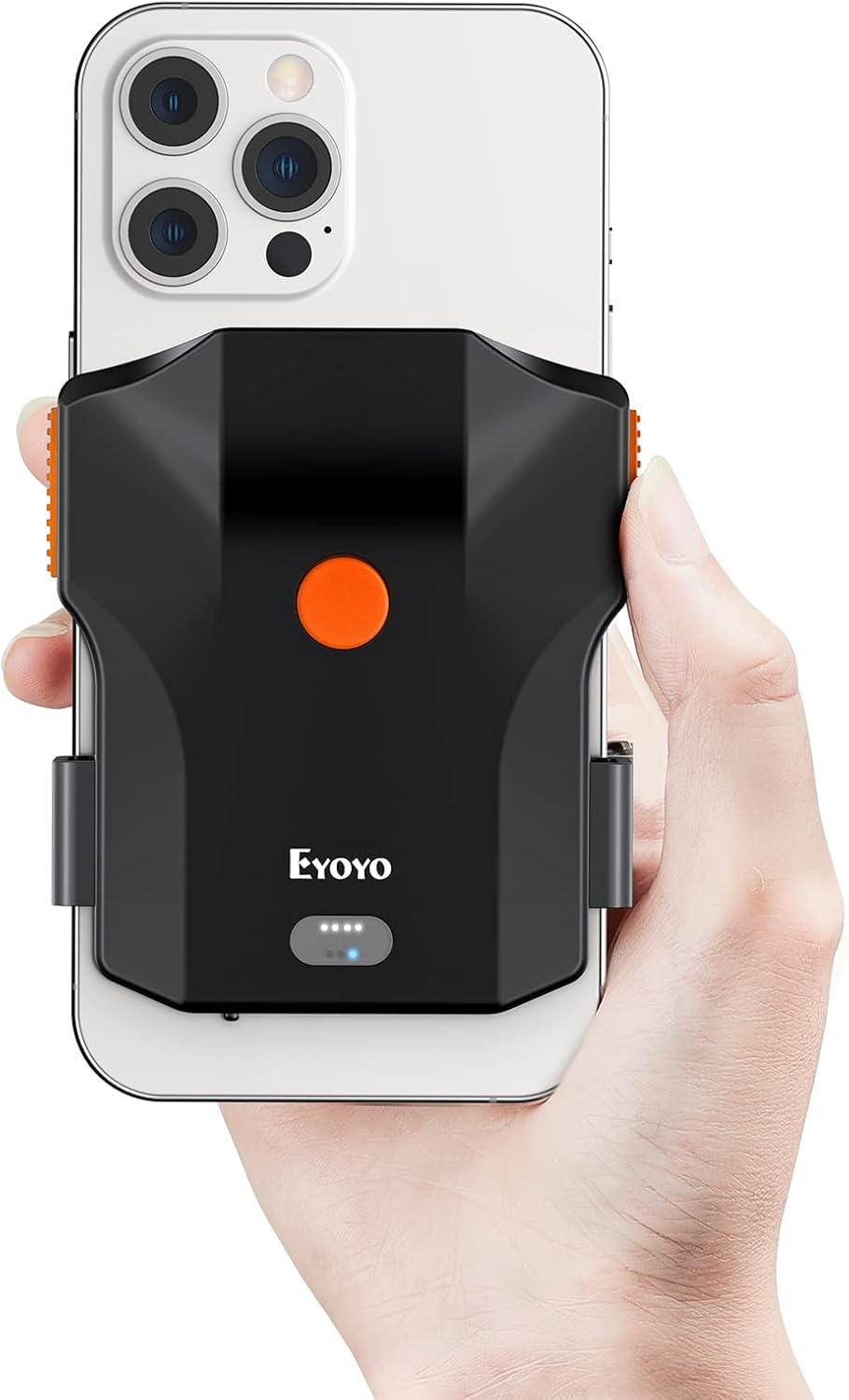
Eyoyo 1D Bluetooth Barcode Scanner Wireless Back Clip Phone Bar Code Reader
Product Information
About
Back Clip Design – PDA in Your Pocket: The Eyoyo barcode scanner is a great smartphone working partner. Simply attach it to your phone, and you can easily scan items to look up barcode information on the spot. It offers a convenient and budget-friendly alternative, removing the need for an extra investment in a PDA. Say goodbye to cumbersome and expensive PDAs.
Horizontal Retractable Clip – For Large & Long Phones: Unlike traditional vertical clips with poor compatibility, this innovative horizontal retractable clip is designed to fit nearly any phone—from a compact 4.7" to a large 7.2" screen—solving the typical issues with large or long-screen smartphones. With a 0.5" deep holder, it also supports heavy phones and thick cases with ease. Enjoy great compatibility and worry-free selection.
1D Lightning-Fast Scanning – Accurate & Fast: Driven by Eyoyo's high-performance laser engine, this 1D inventory scanner rapidly and accurately scans common 1D codes on paper—including Code 128, EAN-8, EAN-13, ISBN, UPC-E, UPC-A, Interleaved 2 of 5, Code 39, Code 32, Codabar, Code 11, GS1 DataBar, and more. If fast 1D barcode scanning is what you need, the EY-032L 1D Barcode Scanner is made for you. Embrace the pleasure of fast scanning.
3-in-1 Connection Ways – Cordless & Corded Freely Switch: With 3 ways to connect—Bluetooth, 2.4G wireless, and USB wired—this Bluetooth barcode scanner lets you freely switch between cordless and corded modes as needed. Wireless options eliminate cable restrictions, while the wired option offers a more stable and dependable connection. It pairs smoothly with many devices, including laptops, PCs, Macs, iPhones, Android devices, tablets, and POS systems. Connectivity without boundaries.
Friendly Clip Design – Never Block Camera: Designed with a horizontal telescopic structure, this wireless barcode scanner won't block your phone's camera—whether it's in the upper left, center, or upper right corner. That makes it highly compatible with most phones on the market. What's more, the Eyoyo scanner is widely used in supermarkets, stores, warehouses, logistics, distribution centers, archives, educational institutions, pharmacies, and retail settings. Choose Eyoyo for easy scanning anywhere.
15H Nonstop Scanning - Power Through Your Day: Powered by a built-in 1200mAh battery, this Bluetooth scanner handles up to 16,000 EAN scans on one charge—no more fear of running out of power during work! It fully recharges in just 3 hours and comes with a physical power switch to save battery, keeping you going all day. Your trusted scanning partner—let your productivity soar.
Battery Level Indicator - No Guesswork on Charging: The EY-032L back clip scanner has a 4-level battery indicator (25%–50%–75%–100%) on the front, so you can easily see battery life and forget about power worries. It supports instant upload and storage modes for flexible data transmission. You can also add custom prefixes and suffixes, turn on hidden character support, and adjust other settings. Enjoy easy personalized customization at work.
2 Ways to Use - Scan Your Way: During busy work, clip this dual-use wireless barcode scanner to your phone for effortless scanning, or use it as a portable scanner on the move. With front, left, and right scan buttons, this wireless 1D barcode scanner has an ergonomic design that fits both left- and right-handed users, ensuring a comfortable angle for scanning and making the process fatigue-free.
Compatible with Most Phones: This laser barcode scanner is compatible with most phones, such as iPhone 11/12/13/14/15/16 (Pro/Max/Pro Max), Samsung Galaxy S8/S9/S10/S20/S21/S22/S23/S24/S25, Note 8/9/10/20, Motorola Edge, Google Pixel 5/6/8, LG G7/G8/V40, and more. Note: Phones featuring holster clip stands, raised sections, or military-grade cases cannot be used with this back clip scanner.
Helpful Tips for Use: 1. The barcode scanner connects via Bluetooth in HID mode and works as an input keyboard (standard for HID mode). 2. To bring up or hide the keyboard while scanning, double-tap the button (iOS only). 3. If you can't answer calls or apps open automatically, it's a Bluetooth HID conflict—simply turn off Bluetooth or the scanner to solve it.


